Adult content filter · Android
A web filter you can’t switch off on impulse.
Spletni ščit blocks sites with adult content on your phone, in every browser and every app. You install it for yourself. Switching it off is only possible after a waiting period you choose in advance, with a code sent to your email.
For Android 8 or newer. Works on Wi-Fi and on mobile data.

- 980,000+
- adult content domains on the blocklist
- 1 hour – 7 days
- of waiting before switch-off, chosen in advance
- 0
- visited sites seen by our server
How it works
Set it up once. After that, it holds by itself.
-
 1
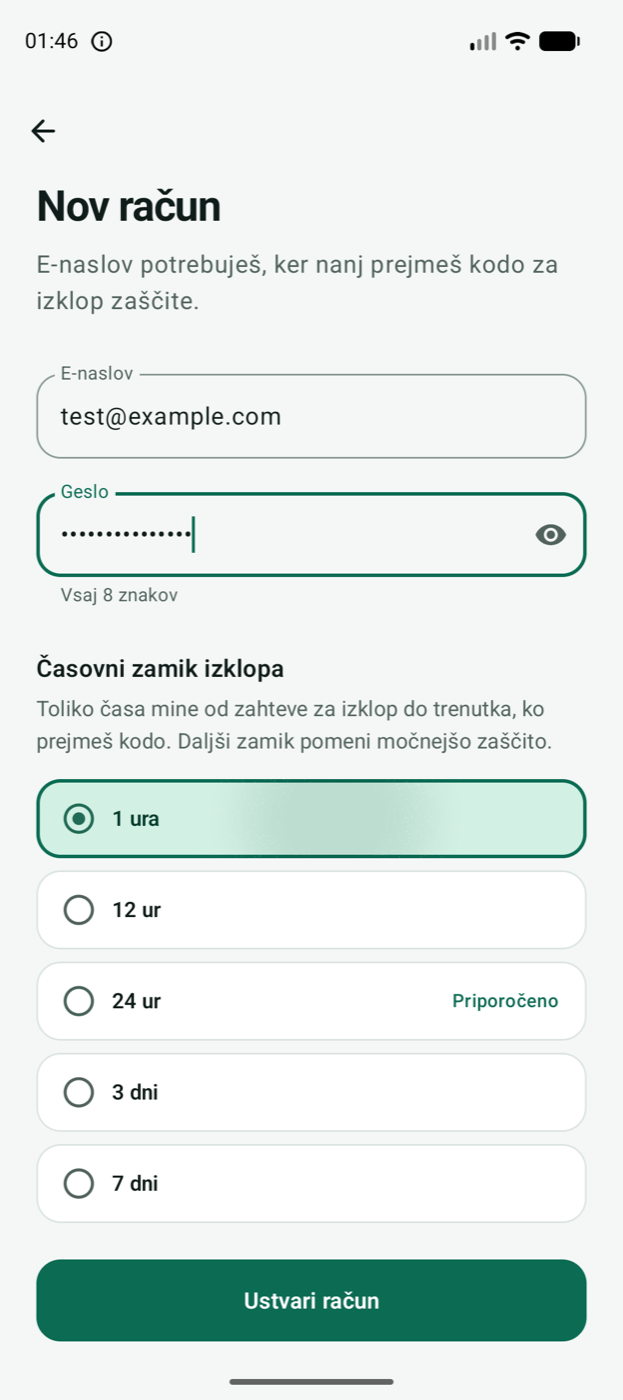
Create an account and choose the delay
You enter your email and choose how much time passes between asking to switch off and receiving the code: from one hour to seven days. A longer delay means stronger protection.
-
 2
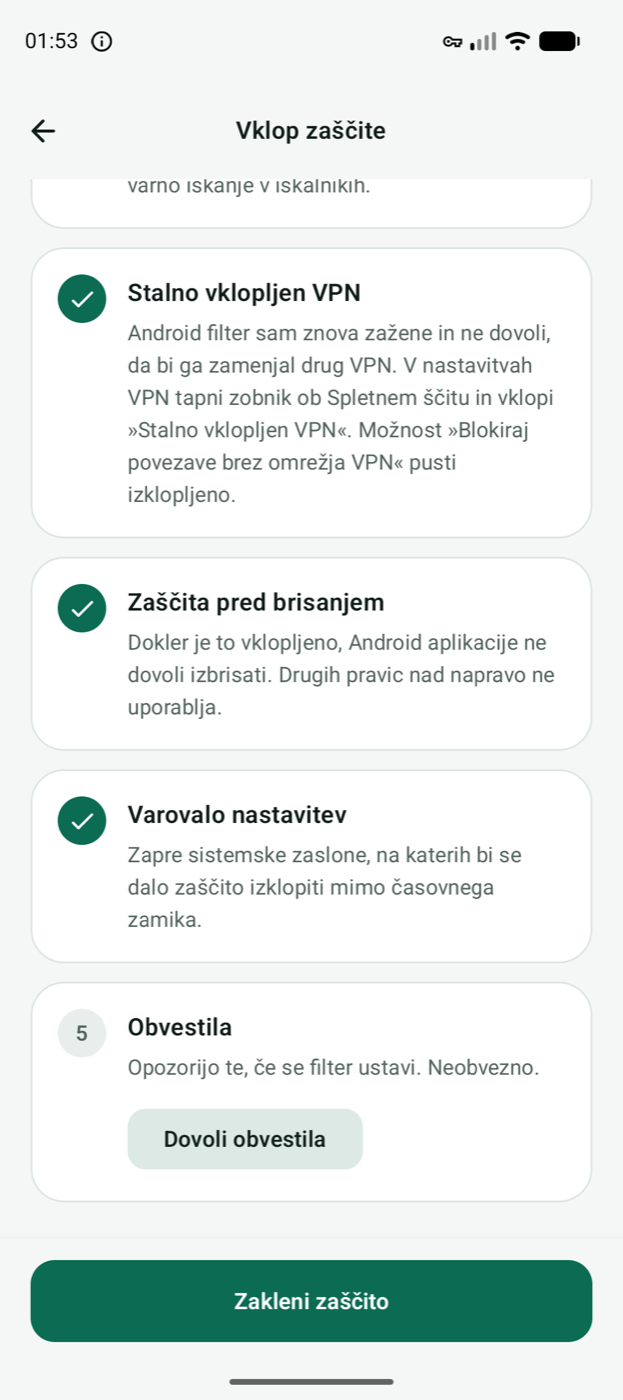
Switch on the filter and lock it
The app walks you through the steps: the filter, always-on VPN, uninstall protection and the settings guard. At the end you lock the protection.
-
 3
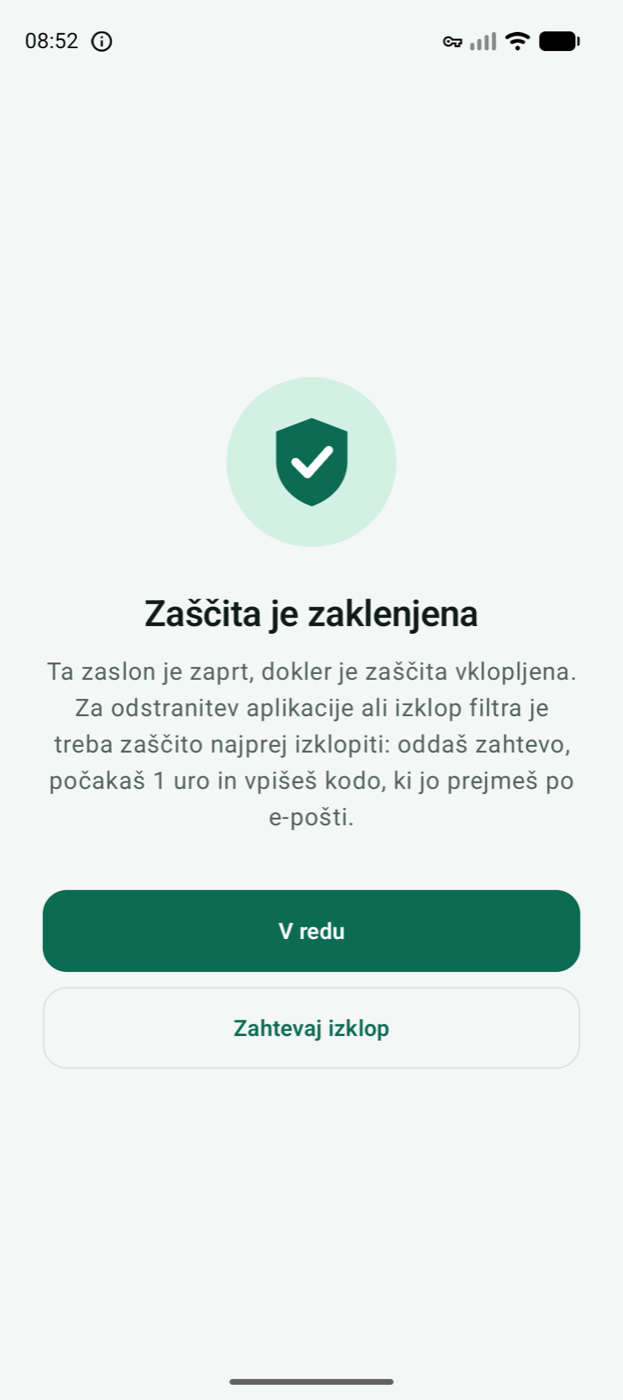
Protection stays on
Inappropriate sites do not open, in any browser or app. An attempt to switch the filter off or uninstall the app ends on this screen.


Delayed switch-off
Switching off is not a button. It is a process.
Between wanting to switch off and switching off there is a period of time you set in advance. Protection keeps working meanwhile, and the decision can settle or pass.
Pick a delay and see when the code would arrive
-
You make a request
Protection stays on.
now -
The delay runs
You can cancel the request at any time.
24 hours -
You receive the code by email
The code is only created now. Until then it exists nowhere, not even on the server.
once the delay is over -
You enter the code
Protection switches off. The code is valid for 24 hours.

-
The server keeps the time
Changing the clock on the phone does not help.
-
The delay cannot be shortened quickly
A shorter delay only takes effect once the current one has passed. A longer one applies at once.
-
Uninstalling takes the same route
The app can only be removed after the request, the delay and the code.
Protection
Built to be hard to get around.
-
Every browser and app
The filter works at the level of the phone, not inside one browser. The same on Wi-Fi and on mobile data.
-
Safe search
Google, Bing and DuckDuckGo are locked to their safe search mode.
-
The VPN comes back by itself
If someone switches it off in the phone’s settings, the app brings it straight back.
-
Uninstalling is locked
While protection is locked, Android does not allow the app to be removed.
-
Known workarounds are closed
Encrypted DNS in browsers, private DNS in settings and manually entered public DNS servers do not get around the filter.
-
No slowdown
Only address lookups pass through the filter. Pages, video and downloads travel directly, as fast as before.
Privacy
It filters your phone. We do not see your browsing.
The app downloads the blocklist in advance and checks addresses on the phone. Allowed lookups go straight to the family resolver Cloudflare for Families, not to us.
Read the privacy policyWhat we never see or store
- Visited and blocked sites
- DNS lookups and browsing history
- Traffic content, messages, location and contacts
What we store
- Your email and a hash of your password
- The chosen delay, language and time zone
- Device model, system version and app version
- Protection events: type and time, without web addresses
Questions
Frequently asked questions
Does Spletni ščit slow down my phone or connection?
Not noticeably. Only address lookups (DNS) pass through the filter; the traffic itself travels directly. In testing, checking an address took about two hundredths of a second, and blocked sites are refused at once.
Can you see which sites I visit?
No. The filter checks addresses on the phone, against a list the app downloads in advance. Our server receives neither visited nor blocked addresses.
Is this a VPN that hides my IP address?
No. Android treats filters of this kind as a VPN, which is why a key icon appears in the status bar. Your traffic does not travel through our servers and your IP address stays the same.
What happens when I want to switch protection off?
You make a request in the app. Protection stays on until the chosen delay is over; then we email you a code that is valid for 24 hours. You can cancel the request at any time.
Can I change the delay later?
Yes. A longer delay applies at once. A shorter one only takes effect after as much time as the current delay has passed, otherwise it would be a way around it.
What if I lose access to my email?
The code is only sent to the email address of the account, so register with an address you can reliably get into. Without it, protection cannot be switched off.
What does Spletni ščit block, and what not?
It blocks sites with adult content. The list is refreshed weekly, and the family resolver Cloudflare for Families filters on top of it. It blocks whole sites, not individual posts, so it cannot tell apart content inside networks such as Reddit or X.
Can it be bypassed?
It closes the known workarounds, but no protection is complete: a factory reset wipes every app, Spletni ščit included. The aim is not a lock that cannot be opened, but enough time and effort for a bad moment to pass.
Does it work on iPhone or on a computer?
For now only on phones and tablets with Android 8 or newer. Versions for iPhone and Windows are planned.
Protection that holds even when willpower does not.
Set it up in a few minutes, on your own phone and on your own terms.
Coming soon to Google Play